
sdr


Increase Virtual RAM - To Make Your System Faster
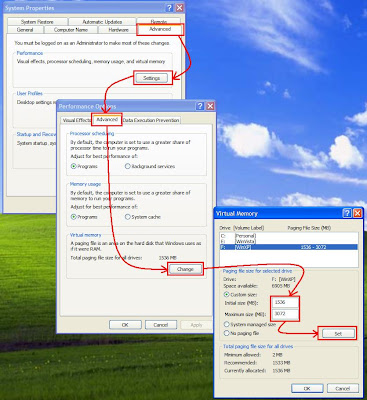
1) Hold down the 'Windows' Key and Press the 'Pause/Break' button at the top right of your keyboard.
(For Win 7 click on Advance System Setting)
8) Click 'Set', and then exit out of all of the windows.
Xara Web Designer MX Premium 8.0.0.21461 + Crack

Xara Web Designer MX Premium 8.0.0.21461 + Crack | 67 MB
Xara Web Designer is unlike any web editor you will have seen before; an
easy template based solution that gives you total page design freedom,
no HTML skills required. Web Designer gives you total design freedom –
using drag and drop you can literally place anything, anywhere on the
page. And things which are normally difficult to achieve in HTML are a
snap in Web Designer – for example text with curved edges, text or
graphics at an angle, text flowing around objects – no problem! Working
with industry standards is vital, so Web Designer sites are W3C
compliant, cross browser compatible (IE 5.5, Firefox, Safari, Chrome)
and XHTML, CSS standards based. It can also import a huge range of files
types for vector graphics, image and text including PDF, RTF, RAW, PSD,
TIFF and of course JPEG, PNG, GIF. Whether you customize one of the
bundled templates or create your own graphics or animations, it’s
genuinely WYSIWYG – what you see in Web Designer is exactly what you get
on your website.
Traditional web authoring tools are really just HTML editors, they are
designed to create text layouts, providing few graphical capabilities.
And yet it’s evident that the vast majority of modern websites are of a
graphical nature. We believe you should have complete freedom to include
anything – text, graphics, photos – anywhere on the page, using just
one tool. And you shouldn’t need to know, or even see, the HTML that
goes into creating your site, any more than a car driver needs to know
how an engine works.
The Web Designer approach is simple: Pick your design from the
templates; customize it with complete freedom; publish. Absolutely no
HTML or javascript skills are required! Templates include individual web
graphics, complete pages and even pre-built multi-page sites.
You only need one program for creating graphical websites – from design
to publishing – and that’s Web Designer. Web Designer includes
customizable template designs plus tools for creating your own vector
graphics and animations, for photo editing (an integrated ultra-fast,
non-destructive photo tool), and for advanced text layout. Site upload
is covered too!
Web Designer’s templates are created by top professional designers, so
the quality is guaranteed. But of course you can customize the color,
text, images, size etc to create your own personal look without any loss
of quality. It’s the best of both worlds!
But we have some clever tricks too, to make things easier for you –
here’s just a few of the things that will save you time and trouble:
Liquid text flow around objects; easy mouseover, thumbnail and pop-up
creation; automatic adjustment of photos to the correct web resolution;
one-click change of site wide theme colors and shades; automatic color
matching of imported objects such as buttons; and buttons and text
panels that automatically stretch as you change the text.
Homepage – http://www.xara.com
Password : mediafirelist
Radiance Skin Pack for Windows 7 (x86)

Radiance Skin Pack is automatically installed on Windows 7, changing the visual components of the system interface (buttons, icons, etc.). As a result, rebooting your system, you will see a new design in the style of Radiance.
The installer is implemented so that you do not need to absolutely no effort in the process of changing the interface, except run the appropriate installer (x86 or x64 - depending on the bit system) - all included in the theme components will install automatically. Before you install the theme you want to disable User Account Control, and close all running programs. After graduating - reboot the system. For quick and correct installation of Radiance Skin Pack to remove (if they have been previously installed), or other other versions of packages to customize the interface (Skin Packs)
Installation:
note: skin pack installer have easy and safe install option, please uninstall old or other versions of skin packs,before install close all other applications and reboot. enjoy

Password : mediafirelist
Download Link
Flash Player 11.4.400.231 Beta 1 ( 64bit & 32bit )

Adobe Flash Player is the high performance,
lightweight, highly expressive client runtime that delivers powerful
and consistent user experiences across major operating systems,
browsers, mobile phones and devices.
Installed on over 750 million Internet-connected desktops and mobile
devices, Flash Player enables organizations and individuals to build and
deliver great digital experiences to their end users.
- Immersive experiences with Flash video, content and applications with full-screen mode.
- Low-bandwidth, high-quality video with advanced compression technology.
- High-fidelity text using the advanced text rendering engine.
- Real-time dynamic effects with filters for Blur, DropShadow, Glow, Bevel, Gradient Glow, Gradient Bevel, Displacement Map, Convolution, and Color Matrix.
- Innovative media compositions with 8-bit video alpha channels.
- Blend modes, radial gradient, and stroke enhancements.
- Additional image formats: GIF, Progressive JPEG, and PNG.
Fedora 15 released with many new features

Fedora 15 operating system's final and stable version is released and available for download. Fedora 15 is powered by linux kernel 2.6.38. It includes dynamic firewall, firefox 4, new full text search tool and double entry accounting system.
Highlights of Fedora 15:
Linux kernel 2.6.38.6;
Btrfs filesystem;
GNOME 3 desktop environment;
Indic typing booster;
Better crash reporting;
Redesigned SELinux troubleshooter;
Gnome Shell user interface;
GTK+ 3.0;
Xorg Server 1.10;
Deja Dup backup software;
LibreOffice 3.3 open source office suite;
Mozilla Firefox 4.0 web browser;
BoxGrinder appliance (virtual machines) builder;
Ledger, double-entry accounting system;
Higher compression in live images;
recoll, full-text search tool;
Dynamic firewall;
IcedTea Java plugin;
RPM 4.9;
Python 3.2;
Rails 3.0.3;
OCaml 3.12;
FreeIPA 2.0;
Maven 3;
GNU Debugger (GDB) 7.3;
GCC 4.6;
Sugar .92 environment;
eCryptfs support in authconfig;
LZMA comperssion for Live images;
Power Management improvements;
Retrace server;
Robotics suite.
Mercury launches USB 3G dongle with WiFi hotspot feature
It supports speeds up to 7.2 Mbps at home and works with any PC, laptop or any device that is WiFi enabled.
Kobian, a player in computer peripherals and tablets, has announced the launch of two new USB 3G dongles under its Mercury brand. Out of the two, one can be used as a WiFi router that can provide WiFi connectivity to six other devices, while the other is a simple universal dongle which is compatible with all telecom providers.
Priced at Rs 2,999, the Mercury 3G dongle router is one of the cheapest in the market. Currently operators like Tata Docomo, Vodafone and Airtel are also offering such routers in the range of Rs 3,500 to Rs 5,000. The other Mercury USB dongle is priced at Rs 1,899.
A WiFI hotspot dongle creates a WiFi network around it, which can be used to connect any WiFi enabled device to internet. Its main benefit is that you can use just one connection to access internet from multiple devices.

Mercury USB Dongle cum Router supports speeds up to 7.2 Mbps at home. It works with any PC, laptop or any device that is WiFi enabled.
Usually, all the USB 3G dongles with or without router functionality have 7.2 Mbps HSDPA download and 5.6 Mbps HSUPA upload speeds. They support GSM with full band of 850/900/1800/1900 MHz and with network standards of IEEE 802.1 b/g/n at an operating frequency of 2.4 GHz. These have an USB interface and draw the power from the tablet, laptop or smartphone to which they are connected.
Sushmita Das, country manager, India, Kobian said, "Internet connectivity is necessity of life and requirement at office, colleges and homes. We bring ease and affordability to this basic need today. The dongle router allows home connectivity for all WiFi enabled devices."
Both the products come with a warranty period of 1 year.
Priced at Rs 2,999, the Mercury 3G dongle router is one of the cheapest in the market. Currently operators like Tata Docomo, Vodafone and Airtel are also offering such routers in the range of Rs 3,500 to Rs 5,000. The other Mercury USB dongle is priced at Rs 1,899.
A WiFI hotspot dongle creates a WiFi network around it, which can be used to connect any WiFi enabled device to internet. Its main benefit is that you can use just one connection to access internet from multiple devices.

Mercury USB Dongle cum Router supports speeds up to 7.2 Mbps at home. It works with any PC, laptop or any device that is WiFi enabled.
Usually, all the USB 3G dongles with or without router functionality have 7.2 Mbps HSDPA download and 5.6 Mbps HSUPA upload speeds. They support GSM with full band of 850/900/1800/1900 MHz and with network standards of IEEE 802.1 b/g/n at an operating frequency of 2.4 GHz. These have an USB interface and draw the power from the tablet, laptop or smartphone to which they are connected.
Sushmita Das, country manager, India, Kobian said, "Internet connectivity is necessity of life and requirement at office, colleges and homes. We bring ease and affordability to this basic need today. The dongle router allows home connectivity for all WiFi enabled devices."
Both the products come with a warranty period of 1 year.
List of some good proxy sites

http://aniscartujo.com/webproxy
http://www.badboysproxy.com
http://www.surfscreened.com
http://www.hagiomusic.info
http://www.greenpips.info
http://urlbrowse.com
http://www.hideipaddress.net
http://www.sneakfilter.com
http://www.browsestealth.com
http://www.sneak1.info
http://proxiesrus.com
http://www.surfindark.com
http://www.navydog.com
http://falsario.com
http://www.proxypit.com
http://www.proxypan.com
http://myspacewebproxy.org/
http://www.allfreehere.info
http://www.takefreely.info
http://autobypass.com
http://www.proxcity.info
http://www.proxyzip.org
http://www.cheekyproxy.com
http://www.eggproxy.com
http://www.theschoolcloak.com
http://www.hidemefast.com
http://browseanywhere.info
http://www.404surf.com
http://www.cloakip.net
http://www.browsedark.com
http://www.dartprox.com
http://www.proxish.com
http://www.surfsneak.com
http://www.surfsneaky.com
http://www.browsehidden.com
http://www.filterhide.com
http://www.browsesneak.com
http://myspaceproxyy.com
http://www.browsesneaky.com
http://www.proxyz.us
http://www.sneakschool.com
http://www.iphide.com
http://www.proogle.info
http://greatproxy.info
http://www.playnsurf.info
http://www.realproxy.info
http://aplusproxy.com
http://www.ecoproxy.com
http://freedom.webtuo.com
http://www.slyuser.com/
http://tenpass.com
http://pawxy.com
http://pawxy.org
http://logu.in
Uninstall Windows programmes with a right click

As you know when ever we want to uninstall any windows program we need to go to control panel and manually uninstall them. But here is the trick which let you uninstall any windows program from their desktop shortcuts. MenuUninstaller is a free software that adds an "Uninstall" option to the Windows context menu so you can remove programs from their shortcuts.
- Download MENU UNINSTALLER and install it on your pc.
- After installing an uninstall option will be added to your windows context menu.
- Right click on any shortcut and you will See Uninstall option as below. click on it to uninstall any programme.

Hope you like It !
VMware Workstation 7 + Serial Key

VMware workstaion is a virtual machine software which allows you to run multiple operating system virtually on same pc. VMware allow testing of live cd without first recording them on a physical disc.This is best tool for software developers and also for new learner who can experience linux and learn how to work on linux by virtually running on their operating system. You can test any operating system before installing it on you computer. It is great software and u must download it.
If you like my post or find any difficulties in installing this software feel free to leave the comment. Below is the link for VMware with serial key.
Transform your windows 7 to Mac os X

- Extract the file and run it as administrator.
- Right click on file and click on Run as administrator.
- Password for the rar file is tricks4u
Subscribe to:
Posts (Atom)